每日签到奶昔超市积分商城奶昔访达
返回列表 发布新帖

[VPS] 【NVIDIA】从注册-->开机-->保活详细全流程

1033 15
发表于 2026-5-21 08:56:05 | 查看全部 阅读模式

登录后免广告,享受更多奶昔会员权益!

您需要 登录 才可以下载或查看,没有账号?注册

×
偷得各位大佬的教程,首先你的有一个能注册且获得NVIDIA开发者计划的邮箱,一般推荐域名邮箱
1,注册。
注册站:https://dsx-air.nvidia.com
注册到最后你要看到如图所示就是符合资格:

2,创建及开机(目前没有资源,需控制台抢。)
创建simulations


把oob-mgmt-server拖到主界面,点击它选择规格+系统


点击右下角的 更新配置
然后双击oob-mgmt-server点击开机

你大概率会遇到没有资源的情况,如下,那就要抢鸡了:

打开控制台
按F12 开发者模式,打开控制台,粘贴命令,回车。

运行以下脚本(记得更换其中simulations ID ):
  1. simulations ID位置在你的浏览器地址栏
复制代码


跑起来后显示HTTP Error: 400 State: REQUESTING均为正常现象,正在尝试开机,且失败重试。
  1. if (window._sMonitor?.isActive) {
  2.   window._sMonitor.destroy();
  3. }

  4. class SMonitor {
  5.   #sid = "4c5987bf-0588-4795-xxxxxxxxx-xxxxxxxxx"; //你自己的simulations ID
  6.   #intervalMs = 3000; //任务间隔 毫秒数
  7.   #abortController = null;
  8.   #timerId = null;

  9.   constructor() {
  10.     this.isActive = true;
  11.     this.#initLoop();
  12.   }

  13.   get #requestConfig() {
  14.     return {
  15.       method: "PATCH",
  16.       mode: "cors",
  17.       credentials: "include",
  18.       referrer: `https://dsx-air.nvidia.com/simulations/${this.#sid}`,
  19.       headers: {
  20.         "accept": "application/json, text/plain, */*",
  21.         "cache-control": "no-cache",
  22.         "pragma": "no-cache"
  23.       }
  24.     };
  25.   }

  26.   async #pingState() {
  27.     const timestamp = () => `[${new Date().toLocaleTimeString()}]`;
  28.     const url = `https://api.dsx-air.nvidia.com/api/v3/simulations/${this.#sid}/start/`;

  29.     try {
  30.       const response = await fetch(url, {
  31.         ...this.#requestConfig,
  32.         signal: this.#abortController?.signal
  33.       });

  34.       const rawText = await response.text();
  35.       let parsedData;
  36.       
  37.       try {
  38.         parsedData = JSON.parse(rawText);
  39.       } catch {
  40.         parsedData = rawText;
  41.       }

  42.       if (parsedData && typeof parsedData === 'object' && 'state' in parsedData) {
  43.         console.log(`${timestamp()} State:`, parsedData.state);
  44.       } else {
  45.         console.log(`${timestamp()} Raw Response:`, parsedData);
  46.       }

  47.       if (!response.ok) {
  48.         console.log(`${timestamp()} HTTP Error:`, response.status);
  49.       }

  50.     } catch (err) {
  51.         console.log(`${timestamp()} Network/Request Failed:`, err);
  52.     }
  53.   }

  54.   #initLoop() {
  55.     this.#abortController = new AbortController();
  56.    
  57.     const tick = async () => {
  58.       if (!this.isActive) return;
  59.       await this.#pingState();
  60.       if (this.isActive) {
  61.         this.#timerId = setTimeout(tick, this.#intervalMs);
  62.       }
  63.     };

  64.     tick();
  65.   }

  66.   destroy() {
  67.     this.isActive = false;
  68.     if (this.#timerId) clearTimeout(this.#timerId);
  69.     if (this.#abortController) this.#abortController.abort();
  70.     console.log("stopped and cleaned up.");
  71.   }
  72. }

  73. window._sMonitor = new SMonitor();
复制代码

3,开机后,做端口映射。
比如你要映射SSH端口:

我涂掉 的就是你的IP+映射端口

首次开机默认用户名 和密码 右下角有显示。
我的是ubuntu和nvidia
自己DD即可。
4,开启API,自动保活
免费用户默认最多保持3天活跃就给你停鸡休眠,所以需要保活。(存疑,之前是3天,但刚才试了试手动延长,竟然没提示拒绝?)
自动保活要用到API,来这里创建你的API:
https://org.ngc.nvidia.com/account/api-keys
选择好权限,创建,记住。

脚本(注意更换你的API和simulation_id):
手动跑一次,日志没问题就创建定时任务即可,脚本作者建议每6小时。
  1. #!/usr/bin/env bash
  2. set -euo pipefail

  3. NVIDIA_AIR_API_BASE="https://api.air-ngc.nvidia.com/api/v3"
  4. NVIDIA_AIR_API_KEY="你的_NGC_API_KEY"
  5. SIMULATION_ID="你的_simulation_id"

  6. target_sleep_at="$(
  7. python3 - <<'PY'
  8. from datetime import datetime, timedelta, timezone

  9. target = datetime.now(timezone.utc) + timedelta(hours=71)
  10. print(target.replace(microsecond=0).isoformat().replace("+00:00", "Z"))
  11. PY
  12. )"

  13. payload="$(mktemp)"
  14. before_body="$(mktemp)"
  15. after_body="$(mktemp)"
  16. trap 'rm -f "$payload" "$before_body" "$after_body"' EXIT

  17. printf '{"sleep_at":"%s"}' "$target_sleep_at" > "$payload"

  18. simulation_url="${NVIDIA_AIR_API_BASE%/}/simulations/${SIMULATION_ID}/"

  19. echo "target_sleep_at=$target_sleep_at"

  20. curl --ipv4 -sS \
  21.   -H 'Accept: application/json' \
  22.   -H 'Content-Type: application/json' \
  23.   -H 'User-Agent: air-sdk/1.3.1' \
  24.   -H 'X-Air-Sdk-Version: 1.3.1' \
  25.   -H "Authorization: Bearer $NVIDIA_AIR_API_KEY" \
  26.   "$simulation_url" > "$before_body"

  27. echo "before_sleep_at=$(python3 -c 'import json,sys; print(json.load(open(sys.argv[1])).get("sleep_at"))' "$before_body")"

  28. curl --ipv4 -sS -X PATCH \
  29.   -H 'Accept: application/json' \
  30.   -H 'Content-Type: application/json' \
  31.   -H 'User-Agent: air-sdk/1.3.1' \
  32.   -H 'X-Air-Sdk-Version: 1.3.1' \
  33.   -H "Authorization: Bearer $NVIDIA_AIR_API_KEY" \
  34.   --data @"$payload" \
  35.   "$simulation_url" > "$after_body"

  36. after_sleep_at="$(python3 -c 'import json,sys; print(json.load(open(sys.argv[1])).get("sleep_at"))' "$after_body")"
  37. echo "after_sleep_at=$after_sleep_at"

  38. if [ "$after_sleep_at" != "$target_sleep_at" ]; then
  39.   echo "verify failed: expected=$target_sleep_at actual=$after_sleep_at" >&2
  40.   exit 1
  41. fi

  42. echo "ok"
复制代码

完事儿,连脚本都是偷的大佬的,感觉有用的话给点个赞

评分

参与人数 1点数 +2 收起 理由
周杰伦 + 2 赞一个!

查看全部评分

爱生活,爱奶昔~

评论15

hkkLv.2 发表于 2026-5-21 09:02:35 | 查看全部
大佬,牛逼!!
爱生活,爱奶昔~
周杰伦Lv.4 发表于 2026-5-21 09:10:47 | 查看全部
很详细的教程
爱生活,爱奶昔~
ArcumbreLv.2 发表于 2026-5-21 09:26:23 | 查看全部
账户不支持是咋回事,我用域名邮箱也不可以,是要教育邮箱吗
爱生活,爱奶昔~
longyuLv.4 发表于 2026-5-21 10:31:39 | 查看全部
牛逼正需要,我的机子就是0CPU没有内存
爱生活,爱奶昔~
kagaLv.2 发表于 2026-5-21 13:03:46 | 查看全部
第一张图片都到不了啊
爱生活,爱奶昔~
hmtdLv.2 发表于 2026-5-21 13:13:08 | 查看全部
厉害啊大佬,支持一下
爱生活,爱奶昔~
credit100Lv.4 发表于 2026-5-21 16:27:20 | 查看全部
There was an error creating your free trial.

爱生活,爱奶昔~
yroiwueiorqwueiLv.3 发表于 2026-5-21 19:18:46 | 查看全部
There was an error creating your free trial.

Failed to start your free trial. Please contact support.
爱生活,爱奶昔~
yamlLv.3 发表于 2026-5-21 19:42:31 | 查看全部
各种失败,启动不了,羊毛太难薅了
爱生活,爱奶昔~
ethanhooksLv.8 发表于 2026-5-21 20:51:58 | 查看全部
本帖最后由 ethanhooks 于 2026-5-21 21:01 编辑

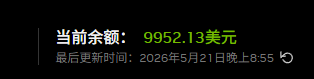
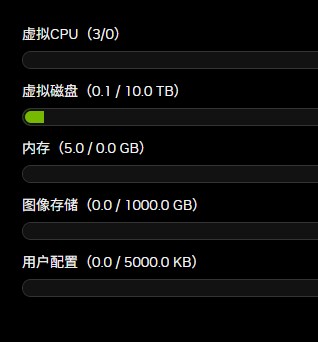
这机器默认开出来的机器都是10G硬盘,我设置成100G也是10G,就开了一台1C1G 和2C4G 2台机器
fakename.png
好像已经取消了 CPU和内存限制了 我也是配额是0
fakename.png
但是机器没关。你们还有配额吗
Org JQ will exceed its concurrent cpu limit by starting this sim. The cpu limit is 0 vCPU, this sim requires 1 vCPU, and this org is already using 3 vCPU.
爱生活,爱奶昔~
Ra1ndownLv.2 发表于 2026-5-21 22:19:18 | 查看全部
创建免费试用时出现了错误。

未能启动免费试用。请联系客服。
爱生活,爱奶昔~
ki1418Lv.2 发表于 2026-5-21 22:35:52 | 查看全部
Failed to start your free trial. Please contact support.
爱生活,爱奶昔~
Pa_keeLv.2 发表于 2026-5-22 11:32:41 | 查看全部
大多数人都开不了机
爱生活,爱奶昔~
XiziLv.2 发表于 2026-5-22 13:36:32 | 查看全部
Failed to start your free trial. Please contact support.

家宽IP都用上了也还是这样
爱生活,爱奶昔~
OccupyMarsLv.1 发表于 2026-5-28 23:48:16 来自手机 | 查看全部
You are eligible for a free trial of NVIDIA DSX Air!
Create your data center digital twin
Connect to nodes as if they were real devices
Feature rich UI with full API access
If you are interested in creating a free trial of DSX Air,
please contact us using the button below.
Contact Us
爱生活,爱奶昔~

回复

您需要登录后才可以回帖 登录 | 注册

本版积分规则

© 2026 Naixi Networks. 沪ICP备13020230号-1|沪公网安备 31010702007642号手机版小黑屋RSS
返回顶部 关灯 在本版发帖
快速回复 返回顶部 返回列表